

What Is an AI Harness?
by Ashwani Kumar Jha, Senior System Analyst
In simple words, a harness is the code that sits around an LLM and lets it actually do things: read files, run commands, search the web. The model writes text. The harness turns that text into actions, and the results back into text.
That's the whole idea. In the rest of this post, we will unpack it with diagrams and real code, because "harness" has quietly become one of the most used and least explained words in AI tooling.
I kept hearing it in podcasts, PR descriptions and launch tweets. "We swapped the harness." "Same model, better harness." "Our harness beats theirs on the benchmarks." So let's build one ourselves, about 80 lines, and see what it actually does.
By the end of this post we'll know:
- what a model can and can't do on its own
- the loop every harness runs
- why Claude Code isn't just a harness
- where tools end and MCP servers begin
- what people actually mean by "agent"
And we'll have a tiny working harness that we can run ourselves.
An LLM on its own can only talk
A language model is a function: text goes in, text comes out. It has no hands. It can't open a file, hit an API or run a command, no matter how smart it is.
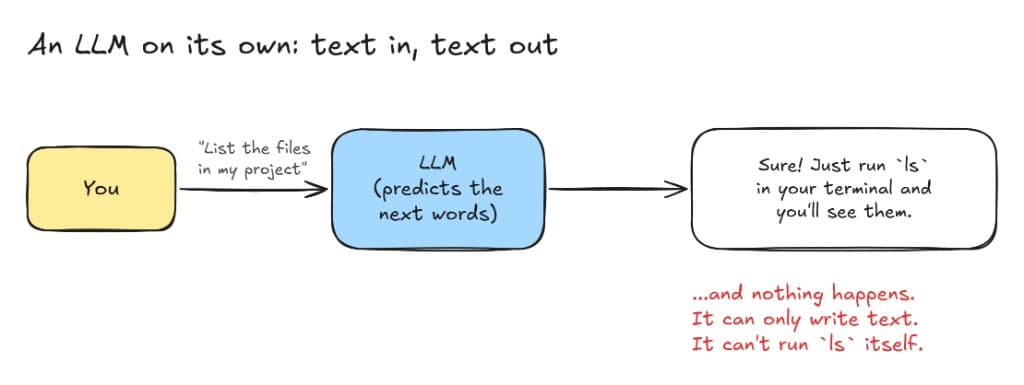
Ask a raw model to list the files in our project and the best it can do is tell us how.
So how do tools like Claude Code or Codex edit our code, run our tests and fix what broke? The model didn't grow hands. Something gave it some.
Enter the harness: a loop with tools
The harness is that something. It's a regular program, often a few hundred lines at its core, that runs a loop between us, the model and a set of tools.
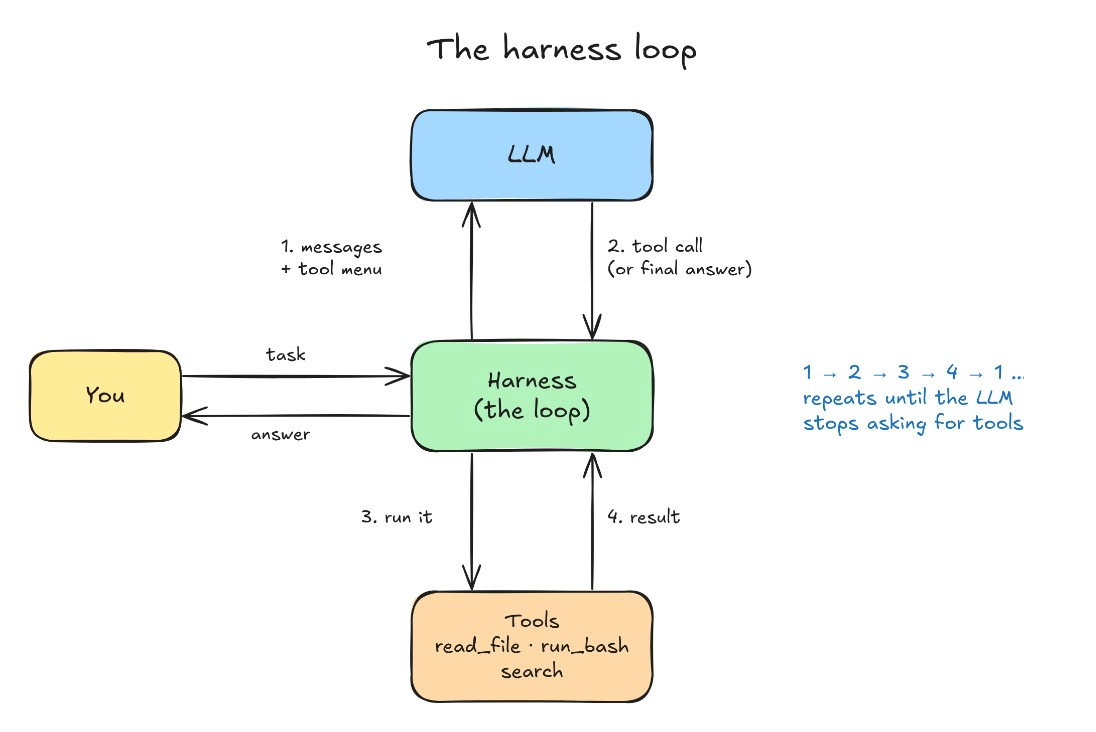
Here's the loop in plain words:
- We give it a task. "Why is the login test failing?"
- The harness calls the model with our task plus a menu of tools: their names, what they do and what arguments they take.
- The model replies with a tool call instead of an answer. In effect: "I want to run
npm test -- login." - The harness runs it. Real code, on a real machine.
- The harness sends the output back to the model as a new message.
- Repeat. The model reads the output, maybe asks to open a file, then to edit one, then to rerun the tests.
- The model finally answers in plain text. No more tool calls, so the loop ends and we get the reply.
The key insight: the model never runs anything. It only asks. The harness decides whether to do it, does it and reports back.
Here's what that conversation actually looks like:
json
// harness -> model
{ "role": "user", "content": "Why is the login test failing?" }

// model -> harness: "I'd like to use a tool"
{ "role": "assistant", "content": [
  { "type": "tool_use", "id": "call_1", "name": "run_bash",
    "input": { "command": "npm test -- login" } }
]}

// harness runs the command, then -> model
{ "role": "user", "content": [
  { "type": "tool_result", "tool_use_id": "call_1",
    "content": "FAIL login.test.ts\n  expected 200, received 401" }
]}

// model -> harness: plain text, so the loop stops
{ "role": "assistant", "content": "The test expects a 200 but gets a 401. The test user's token has expired..." }
That's it. Every coding agent we use is some version of this loop.
"So Claude Code/Codex is a harness?" Sort of
Claude Code, Codex and similar tools are really two things glued together: an interface we look at, and a harness that does the work underneath.
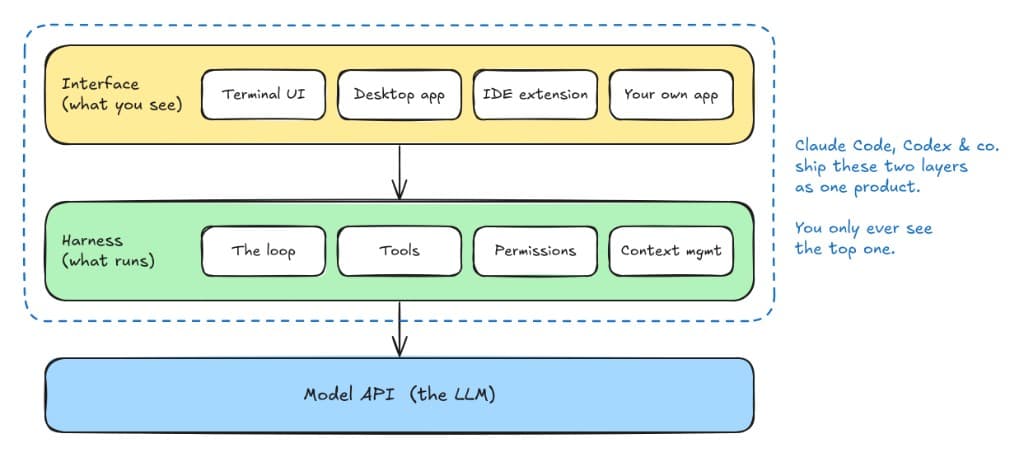
- The interface is what we see: the terminal UI, the desktop app, the panel in our editor. It renders messages, shows diffs and asks us to approve commands.
- The harness is what runs: the loop, the tools, the permission checks, the logic that decides what to keep in context.
Because they ship as one product, people use the names interchangeably. But they're separable, and that's where it gets interesting. Anthropic exposes the harness behind Claude Code as the Claude Agent SDK, and Codex's harness can be driven too. That means we can put our own interface on top of a battle-tested harness: a Slack bot, an internal dashboard, a CI job that fixes lint errors overnight.
A useful mental model from web dev: the interface is the frontend, the harness is the backend, and the model is a very smart external API the backend calls.
Tools vs MCP servers
A harness gets its abilities from two places: built-in tools it ships with, and MCP servers we plug in.
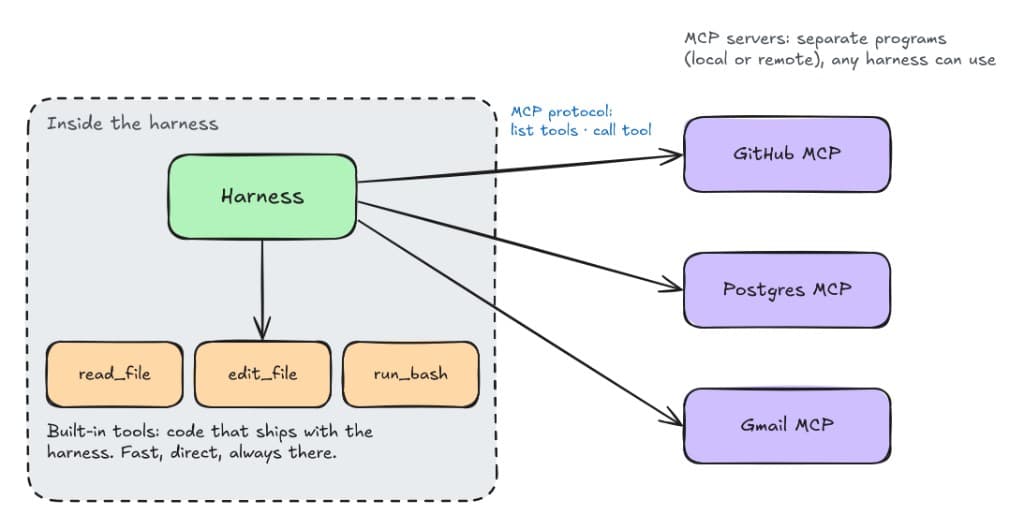
Built-in tools are functions inside the harness itself: read a file, edit a file, run a shell command, search the web. They're fast and always available, but only the harness author can add them.
MCP servers (Model Context Protocol) are separate programs that offer extra tools over a standard protocol. The harness asks each server "what tools do you have?", adds them to the menu it shows the model, and forwards any calls. A server can run on our laptop or on someone else's cloud.
The big win of MCP: someone writes a GitHub server once, and it works in Claude Code, Cursor, our homemade harness and whatever comes out next year.
So what is an "agent"?
An agent is an LLM running inside a harness. That's it.
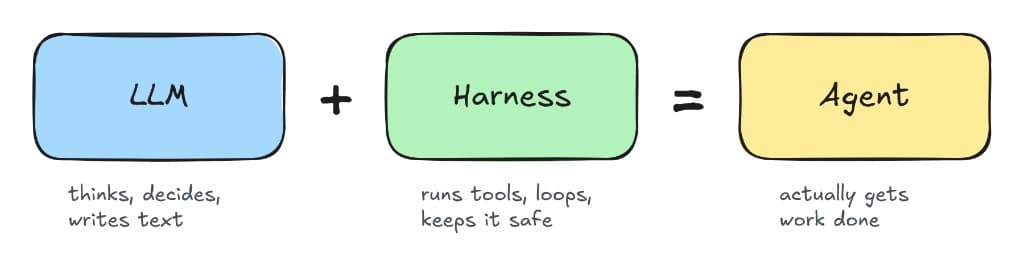
- LLM alone: smart, but can only talk.
- Harness alone: a loop with tools and nobody deciding what to do.
- LLM + harness: something that reads, decides, acts, checks the result and keeps going until the job is done.
This also explains why two "agents" built on the same model can feel completely different. Most of the difference lives in the harness: which tools it offers, how it describes them, the system prompt, how it trims long context, when it asks for permission. Same brain, different body.
A "coding agent" is a harness with file and shell tools. A "research agent" is a harness with search and fetch tools. A "support agent" is a harness with tools for ticketing system. The model can be identical in all three.
Let's build a tiny harness in about 80 lines
JavaScript
import Anthropic from "@anthropic-ai/sdk";
import { readFileSync } from "node:fs";
import { execSync } from "node:child_process";

const client = new Anthropic(); // reads ANTHROPIC_API_KEY from env

// 1. The tools: plain JavaScript functions
const tools = {
  read_file: ({ path }) => readFileSync(path, "utf8"),
  run_bash: ({ command }) => {
    try {
      return execSync(command, { encoding: "utf8", timeout: 30_000, stdio: "pipe" });
    } catch (err) {
      return (err.stdout ?? "") + (err.stderr ?? err.message);
    }
  },
};

// 2. The menu: what the model is told it can call
const toolSpecs = [
  {
    name: "read_file",
    description: "Read a text file and return its contents.",
    input_schema: {
      type: "object",
      properties: { path: { type: "string" } },
      required: ["path"],
    },
  },
  {
    name: "run_bash",
    description: "Run a shell command and return its output.",
    input_schema: {
      type: "object",
      properties: { command: { type: "string" } },
      required: ["command"],
    },
  },
];

// 3. The loop: ask, run what it asks for, feed back, repeat
async function runAgent(task) {
  const messages = [{ role: "user", content: task }];

  while (true) {
    const response = await client.messages.create({
      model: "claude-sonnet-5-5",
      max_tokens: 2048,
      tools: toolSpecs,
      messages,
    });
    messages.push({ role: "assistant", content: response.content });

    if (response.stop_reason !== "tool_use") {
      return response.content
        .filter((block) => block.type === "text")
        .map((block) => block.text)
        .join("");
    }

    const results = [];
    for (const block of response.content) {
      if (block.type === "tool_use") {
        console.log(`-> ${block.name}(${JSON.stringify(block.input)})`);
        const output = tools[block.name](block.input);
        results.push({
          type: "tool_result",
          tool_use_id: block.id,
          content: output.slice(0, 10_000),
        });
      }
    }
    messages.push({ role: "user", content: results });
  }
}

console.log(await runAgent("How many JavaScript files are in this folder, and what does the biggest one do?"));
Save it as tiny_harness.mjs, run npm install @anthropic-ai/sdk, set ANTHROPIC_API_KEY, then run node tiny_harness.mjs (Node 18+). Try it in a scratch folder: run_bash runs whatever the model asks for, with no confirmation. We'll see the model call run_bash a couple of times, maybe read_file, and then answer.
Look at what's in there:
- Tools are ordinary functions. Nothing AI about them.
- The menu (
toolSpecs) is JSON that tells the model each tool's name, purpose and arguments. - The loop sends the conversation, checks whether the model wants a tool, runs it, appends the result and goes again. It stops when the model replies without asking for a tool.
Every real harness is this loop plus a lot of hardening. Here's what production harnesses add on top, and why:
| Feature | Why it matters |
|---|---|
| Permission prompts | We don't want rm -rf running without a yes from us |
| Sandboxing | Limits the damage a bad command can do |
| Context management | Long sessions overflow the context window, so old turns get summarized or trimmed |
| Better edit tools | Exact find-and-replace edits beat rewriting whole files |
| Subagents | Hand a side task to a fresh context and get back only the answer |
| Retries and timeouts | Tools fail, networks drop |
| A good system prompt | Tells the model how to use the tools well |
Next time someone says "same model, better harness", we know what they mean. The model didn't change. The loop around it did.