

Extract data from a QR code in Elixir
by Atul Bhosale,
After I had finished working on writing a QR code generator using Elixir for one of our clients, there was a requirement to extract the data from a QR code and storing it. This post is about how I learned to extract the data from a QR code in Elixir.
I came across zbar while searching for a tool to read a QR
code. Since I will be using this tool to read the QR code image I will have to
use System.cmd() in my code to run the zbar binary.
	defmodule Sample do
	  def qr_string(image_path) do
	    System.cmd("zbarimg", [image_path], stderr_to_stdout: true)
	  end
	end
When the stderr_to_stdout option is set to true, the error details will be
included in the tuple returned by Sysmtem.cmd.
I generated a QR code with Hello world as the data.

When I run the above code I get the following:

I just need the QR data i.e. Hello world in this case, but it returns a tuple
with first value as string & second as 0. I was curious to know why 0 is
returned.
I tried scanning an invalid QR code image like the Codemancers logo.


Notice that now it returns 4. For invalid or non-QR code images, the
zbarimg library will return 4.
what about an invalid file type?

We can extract the data for 0, return "No QR code present" for 4 and return "Invalid file" for anything else.
    defmodule Sample

      require Logger

      def qr_string(image_path) do
        case System.cmd("zbarimg", [image_path], stderr_to_stdout: true) do
          {data, 0} ->
            data

          {data, 4} ->
            raise Logger.info("No QR code present. msg: #{data}")

          {data, _} ->
            raise Logger.info("Invalid file. msg: #{data}")
        end
      end
    end
We still need to extract the QR code data from the string.

We can split the string & find the data.

I came across <> operator which can be used for string pattern matching,
using which I could find the data in the string.

The existing code can be updated to:
    case System.cmd("zbarimg", [image_path], stderr_to_stdout: true) do

      {data, 0} ->
        "QR-Code:" <> result =
          data
          |> String.split("\n")
          |> List.first()

        result

      {data, 4} ->
        raise Logger.info("No QR code present. msg: #{data}")

      {data, _} ->
        raise Logger.info("Invalid file. msg: #{data}")
    end
I was able to extract the QR code data from a QR code image. Following is the screenshot of the data extracted from a QR code image.

Update: I received a recommendation about parsing QR code data from Antonin Kral, which is as follows:
In case the data stored in QR code consists of multiple lines, its recommended
to use --xml option while using zbarimg
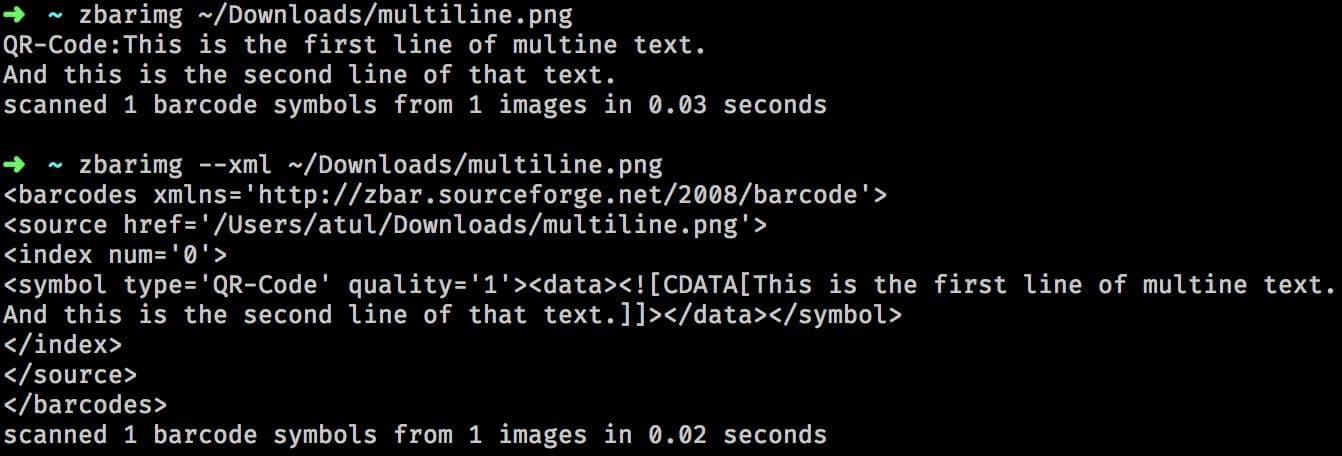
The Elixir code will be:
    args = ["--xml", image_path]
    System.cmd("zbarimg", args, stderr_to_stdout: true)
Note: In our client's requirement, the QR code data didn't span multiple lines
hence I haven't used --xml option in my examples.