

Getting Started with DeepAgents: Building Structured, Long-Running AI Agents
by Nived Hari, System Analyst
A practical introduction to LangChain’s Deep Agents
Most LLM-based agents struggle the moment a task needs multiple steps, context retention, or any sort of long-term reasoning. They’re great at quick answers, but put them in a real workflow and things start to fall apart.
DeepAgents changes that. It gives agents the planning ability, memory, and structure they’ve been missing — making them far more reliable for complex and long-running tasks.
In this post, we’ll explore the DeepAgent within the LangChain ecosystem, how it works, and why it’s becoming a powerful choice for building structured, production-ready AI agents.
Let’s take a closer look at what it brings to the table.
What Are DeepAgents?
DeepAgents is a standalone framework that builds on LangGraph and integrates seamlessly with the LangChain ecosystem to provide a structured, long-running reasoning system for AI agents.
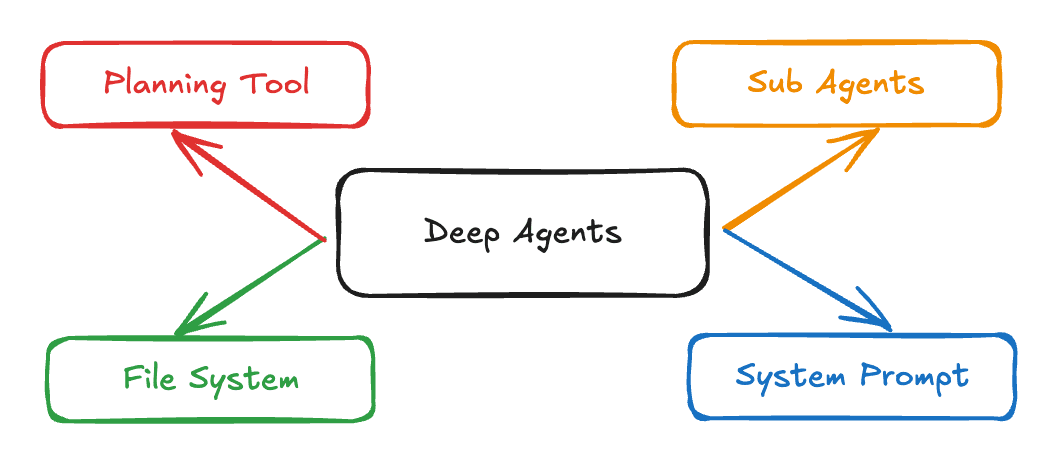
Instead of a simple LLM calling tools in a loop, DeepAgents comes with:
- 🗂 A built-in filesystem (to store notes, drafts, files)
- 📝 A planning system (write todos, track progress)
- 🧠 Persistent memory (remember context across runs)
- 🔌 Extendable tools (bring your own tools, prompts, workflows)
In short:
- Shallow agent: forgets the bigger picture
- Deep agent: stays organized, remembers details, and follows a structured plan
Why Do We Even Need Deep Agents?
Because real-world tasks are not:
“Summarize this.” ✔️
They’re:
“Research these 8 websites, find patterns, generate code, write a report, and save everything in a folder.”
…and shallow agents treat this like a puzzle they immediately forgot.
DeepAgents gives LLMs the superpower to handle complexity with structure:
- They break your goal into subtasks
- They store intermediate work on a virtual filesystem
- They execute tasks iteratively and reliably
Essentially — the difference between making it up as you go and running things properly.
Core Features (The Stuff That Makes DeepAgents Actually Deep)
1. 📝 Planning & TODO Decomposition
DeepAgents include a built-in write_todos tool.
The model converts your high-level goal (e.g., “Write a research report”) into:
- Clear subtasks
- Dependencies
- Execution order
- Task tracking
2. 📁 A Virtual Filesystem
The agent gets tools like:
write_fileread_fileappend_fileedit_filelsdelete_file
This means your agent can:
- Save drafts
- Write intermediate code
- Maintain notes
- Store research findings
- Track state across steps
3. 🤝 Subagents (Isolated Workspaces for Complex Tasks)
DeepAgents can spawn subagents — lightweight task-specific agents with their own temporary context and execution loop.
Why Use Subagents?
Subagents solve the context-bloat problem.
When tools produce large outputs (web search, file reads, DB queries), the main agent’s context window fills up fast.
Subagents isolate that heavy work, and the main agent only receives the final result — not the noisy intermediate steps.
When to use:
- Multi-step tasks that would clutter the main agent’s context
- Specialized tasks needing custom instructions or tools
- Tasks requiring different model capabilities
- Keeping the main agent focused on high-level orchestration
When not to use:
- Simple tasks
- When intermediate context must be preserved
- When overhead is not worth it
4. 🧠 Summarization via LangChain Middleware
When conversation state approaches token limits, the SummarizationMiddleware:
- Summarizes older messages
- Replaces them with concise versions
- Preserves recent messages
- Prevents prompt bloat
5. 🔄 Memory / Persistence
Using LangGraph’s state store, agents can:
- Remember previous tasks
- Store preferences
- Resume from last state
- Maintain evolving knowledge
6. 🧩 Customizable & Extensible
You can extend DeepAgents with:
- Custom tools
- Custom planning logic
- Specialized subagents
Example Real-World Use Case
📚 Research Workflow Agent
- Gather resources
- Crawl websites
- Extract insights
- Summarize
- Organize findings
- Save drafts
- Output a polished report
When Should You Not Use DeepAgents?
Avoid DeepAgents if:
- You just need a quick tool call
- Tasks are simple
- You don’t need memory
- You’re building a lightweight chatbot
Quickstart Example (Step-by-Step)
Below is the minimal setup needed to create and run a DeepAgent. You’ll build a research agent that can conduct research and write reports.
Prerequisites
Before you begin, make sure you have an API key from a model provider (e.g., Anthropic, OpenAI) and a Tavily API key.
Step 1 — Install dependencies
bash
pip install deepagents tavily-python
Step 2 - Set up your API keys
bash
export ANTHROPIC_API_KEY="your-api-key"
export TAVILY_API_KEY="your-tavily-api-key"
Step 3 - Create a search tool
Python
import os
from typing import Literal
from tavily import TavilyClient
from deepagents import create_deep_agent

tavily_client = TavilyClient(api_key=os.environ["TAVILY_API_KEY"])

def internet_search(
    query: str,
    max_results: int = 5,
    topic: Literal["general", "news", "finance"] = "general",
    include_raw_content: bool = False,
):
    """Run a web search"""
    return tavily_client.search(
        query,
        max_results=max_results,
        include_raw_content=include_raw_content,
        topic=topic,
    )
Step 4 - Create a deep agent
Python
# System prompt to steer the agent to be an expert researcher
research_instructions = """You are an expert researcher. Your job is to conduct thorough research and then write a polished report.

You have access to an internet search tool as your primary means of gathering information.

## `internet_search`

Use this to run an internet search for a given query. You can specify the max number of results to return, the topic, and whether raw content should be included.
"""

agent = create_deep_agent(
    tools=[internet_search],
    system_prompt=research_instructions
)
Step 5 - Run the agent
Python
result = agent.invoke({
    "messages": [{"role": "user", "content": "Research the latest breakthroughs in solar panel efficiency"}]
})

# Print the agent's response
print(result["messages"][-1].content)
Bonus: Deep-Agents UI (A Ready-Made Interface for Exploring Your Agents)
The Deep-Agents UI is an open-source interface built to help you see what your DeepAgent is doing while it works. It's a great way to explore your agents and see how they work.
What it offers:
- View the agent's filesystem
- Inspect plans, TODOs, and tasks
- Watch tool calls as they happen
- Insight into subagent creation and activity
- Debug agents step‑by‑step
- A structured way to explore long-running workflows
Try it:
bash
git clone https://github.com/langchain-ai/deep-agents-ui
cd deep-agents-ui
yarn install
yarn dev
Why it's helpful:
- Makes agent behavior easier to understand
- Helps illustrate how DeepAgents break down and execute work
- Great for teaching, demos, or internal documentation
- Useful during development when refining tools, prompts, or workflows
Final Thoughts
DeepAgents solve a real pain point:
We don’t just need agents that respond — we need agents that work.
If shallow agents are calculators, DeepAgents are collaborators that can plan tasks, keep notes, and carry a project from start to finish with structure.
Here’s to deeper workflows! 🥂